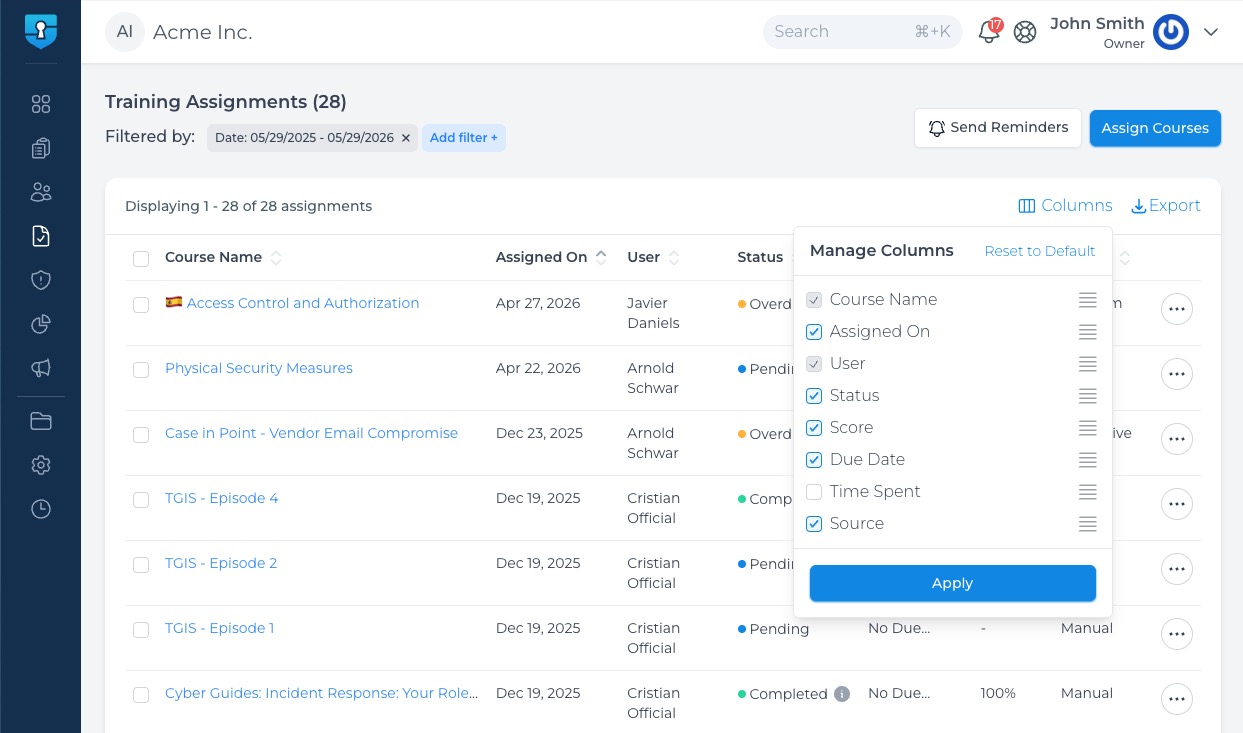
We’ve upgraded all data tables across both the Command Center and Company Portals to give you total control over how you view and manage your data. You can now declutter your screen and tailor your layouts to show only the information that matters most to your workflow.
🌟 Key Enhancements:
Show or Hide Columns: Choose exactly which metrics and data points appear on your screen, letting you hide the noise and focus on what’s relevant.
Drag-and-Drop Reordering: Easily change the left-to-right sequence of your columns. Drag your most critical data points to the front and center.
Fluid Horizontal Scrolling: No more squished text or overlapping fields on large datasets. Tables now maintain clean, readable spacing, allowing you to scroll horizontally to see more data.Table Views
⚙️ How It Works:
Click the Columns action button in the top-right corner of any table.
Check or uncheck columns to show or hide them.
Drag items up or down in the list to rearrange their left-to-right positioning.
Click Apply Changes to save your layout.
💡 Pro Tip: Your customized view saves automatically to your admin profile, meaning your preferences will be waiting for you the next time you log in without altering the layout for other admins. Want to start fresh? Just click "Reset to Default" at any time.